Smart reframing
Crop video around the people who matter
A fixed center crop can cut speakers out of frame. Clip Splitter inspects the selected clip, finds relevant faces, and maps the crop to the requested output shape.
Create your clips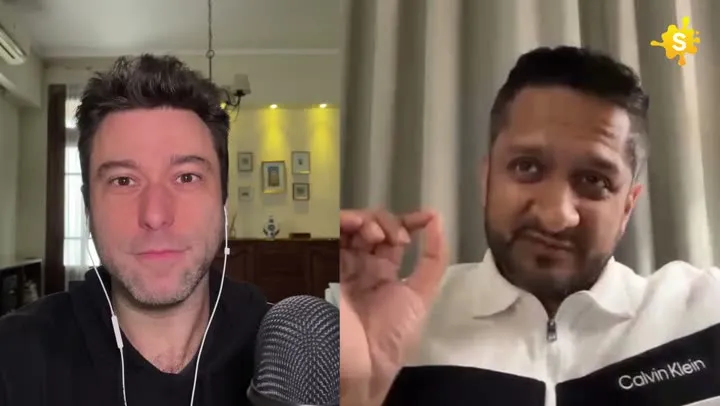

Keep the conversation visible when the canvas changes.
How it works
From source video to finished clips
- 01
Choose an output shape
Use portrait, square, or keep the original format.
- 02
Analyze the selected shots
Clip Splitter looks for speakers and relevant subjects.
- 03
Render the smart crop
The final frame follows those targets through the clip.
Made for
Use it across your content library
Questions
Does AI cropping stretch the video?
No. It selects a crop within the original frame and scales it proportionally for the output.
What happens when the camera angle changes?
Clip Splitter can use multiple crop keyframes so the framing can respond to different shots within the same clip.
Decide what the crop should follow
An AI video cropper can help keep relevant subjects visible when the output frame differs from the source. The first editorial decision is identifying what counts as relevant. In an interview it may be the active speaker; in a demonstration it may be a hand, an object or a combination of both. A face is not automatically the most important element of every shot. Watch the selected moment and name the information the audience needs. That gives you a concrete way to review the crop rather than accepting any result that keeps someone near the centre.
Consider the relationship between the subject and the spoken explanation. If a presenter says “compare these two examples,” both examples may need to remain visible. If a guest points toward another person, the relationship between them can matter more than a close-up of either face. Automated framing is a useful starting point, but the source’s meaning determines whether the result is appropriate. A crop can be technically smooth and still remove essential context. The review should ask what the frame communicates, not only whether it contains a recognised subject.
Separate framing errors from selection errors
Sometimes a crop seems impossible because the selected moment is poorly suited to the intended output. A wide group exchange with constant interruptions may be difficult to present in a narrow frame. Another passage from the same recording may communicate the idea through a single clear speaker. Before trying to solve every problem through framing, check whether a different moment would work better. Selection and cropping should support each other. A complete, visually simple explanation can be more useful than a dramatic exchange that loses meaning when adapted.
Keep the original composition available for comparison. If the source already presents the information clearly, consider whether a less aggressive crop or the original frame is the stronger choice. The purpose of reframing is to improve the viewing experience in a new context, not to demonstrate that every recording can be made to fit every shape. When a source contains essential information across its full width, acknowledge that constraint in the editorial decision. A narrower export is not automatically an improvement if it makes the viewer work harder to understand what is happening.
Review the beginning and ending carefully
The first frame sets the viewer’s understanding of the scene. Confirm that the crop begins on a meaningful subject rather than catching a transition, an empty part of the room or a person who is no longer speaking. The final frame deserves the same attention. A crop that moves away from the speaker during the last sentence can make the ending feel accidental. Watch the boundaries of the selected clip in their original context, because the source may contain a camera change just before or after the extracted moment.
Look for movements that cross those boundaries. A presenter might lift a product near the beginning or turn toward a screen near the end. If the selected clip cuts away the setup for that movement, the framing may appear to follow something without explaining why. Adjust the editorial choice so that the viewer can understand the action. A clean crop should support a clean beginning and ending. It cannot repair an incomplete thought or a demonstration that starts after the important object has already been introduced outside the clip.
Judge tracking by the viewer’s attention
Motion in the crop should help the audience follow the subject. Small natural movements do not always require a visible correction. If the frame reacts to every lean or gesture, the result can feel restless even when the subject never leaves the image. Watch the clip at normal speed and notice whether your attention stays on the explanation or shifts to the movement of the frame. A comfortable result usually gives the viewer a stable sense of where to look while accommodating meaningful changes in the scene.
Speaker changes require a different judgement from minor body movement. When another person begins a substantive response, the frame may need to make that change clear. But a brief acknowledgement from off camera does not necessarily justify an abrupt reframing. Review the conversational rhythm rather than applying a rule that every sound should trigger a new composition. The right choice depends on how much visual context the audience already has. A wider source view may establish the participants well enough that the occasional off-screen response remains easy to understand.
Protect objects, gestures and on-screen labels
Many useful clips communicate through more than a face. A speaker may hold a sample, point to a chart or show a small action with their hands. Check those moments individually. If the crop follows the face while removing the demonstration, the viewer receives the explanation without its visual evidence. Decide which elements need to share the frame and whether the chosen aspect ratio can accommodate them clearly. A slightly smaller face may be a worthwhile trade-off when it keeps the important object readable throughout the clip.
Existing graphics need similar attention. A source lower third can be cut in half, a product label can move beyond the edge or a chart heading can disappear while the chart itself remains. These fragments can confuse a viewer who has not seen the original image. Do not assume that a graphic is unimportant because it appears only briefly. Review the scene where it enters and exits, and check whether new captions overlap it. Framing and text placement should be evaluated together whenever the source already contains information written into the picture.
Assess crop quality on realistic displays
The editing preview is not the final viewing environment. Inspect the exported file on a phone or at a comparable display size. A face may look comfortably framed on a large monitor while occupying too much of a small screen once captions are added. Fine details may also become harder to distinguish after cropping and export. Evaluate what is visible rather than relying on the file’s nominal dimensions. The source quality, the amount of enlargement and the composition all contribute to whether the result feels clear.
Watch once without reading the captions and once while relying on them. This reveals whether the framing and text compete for attention. If your eyes must repeatedly move between distant areas to connect a spoken instruction with an object, reconsider the composition. If the captions cover the object, changing the wording alone will not solve the problem. Treat the final clip as one coordinated presentation. A successful crop makes the image easier to understand in that presentation, rather than appearing correct only when assessed in isolation from the other elements.
Keep a clear acceptance checklist
An approval checklist helps reviewers make consistent decisions across several clips. It should describe visible outcomes rather than the internal method used to produce them. For example, “the product remains visible during the demonstration” is more useful than “tracking enabled.” The first statement can be checked directly in the exported file. The second only describes a setting. Keeping the review focused on outcomes also makes it easier to explain why one automatically generated result is accepted while another needs a different moment or framing choice.
- The opening frame identifies the relevant subject immediately.
- Speaker changes remain understandable without distracting movement.
- Important gestures and objects stay visible when they carry meaning.
- Source labels and added captions remain readable and complete.
- The crop does not enlarge weak source detail beyond useful clarity.
- The ending feels deliberate and preserves the final thought.
Save the approved result with its source reference and keep alternate framing experiments clearly labelled. When a reviewer requests a change, record the reason so that the next clip can benefit from it. Repeated problems may reveal that the recording setup needs improvement, such as more space around a speaker or a better position for a demonstration. An effective AI cropping workflow therefore includes both immediate review and feedback into future recording. The aim is a consistently understandable image, not the greatest possible amount of automated camera movement.
A worked editorial example
Imagine an interview guest who leans forward while answering, then turns to point at a sample on the table. A crop that responds to every small lean may move unnecessarily, yet a crop that ignores the sample may miss the important action. Watch those movements as separate editorial events. The first may be comfortable within a stable frame; the second may require a composition that includes the object. Review the result with captions present, because the available space changes once text is added. If the source cannot show the face and sample clearly in the selected shape, compare a wider output. This is a useful acceptance test because it asks whether the audience receives the intended information through the entire explanation.
Your next clip is already in the video.
Let Clip Splitter find it, frame it, and caption it.
Start clipping