Portrait video
Turn landscape footage into vertical social clips
Clip Splitter analyzes the selected moment and reframes it for portrait video. The crop can move as the shot changes instead of staying fixed at the center.
Create your clips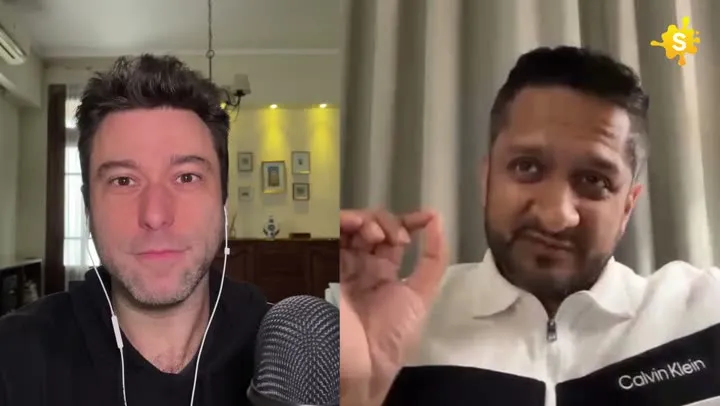

A vertical crop that follows the subject, not the middle of the frame.
How it works
From source video to finished clips
- 01
Start with any supported shape
Upload landscape, square, or portrait source video.
- 02
Choose portrait
Select the 9:16 output option before processing.
- 03
Review the framing
Clip Splitter renders the chosen moments around detected subjects.
Made for
Use it across your content library
Questions
Will portrait video stretch my footage?
No. Clip Splitter crops and reframes the source rather than stretching it.
Can the crop change during a clip?
Yes. The framing can follow scene and subject changes within the selected moment.
Design the frame around the information
Turning a horizontal recording into a vertical video is a composition decision, not merely a change to the shape of the file. The original image may have been arranged around two speakers, a wide desk or a presentation beside the presenter. A narrower frame cannot preserve every part at the same apparent size. Begin by deciding what the viewer must see to understand the selected moment. A face may be enough for a personal explanation, while a demonstration may depend on hands, an object or details in the surrounding scene.
Write down the visual priority before approving a crop. For example, the priority might be keeping a speaker and the product they hold together, or showing both sides of a comparison. This makes the review more specific than asking whether the clip looks good. An attractive close-up can still fail if it removes the evidence behind the spoken point. The best vertical version preserves the relationship between the image and the explanation. It should feel composed for the new frame rather than like a window cut arbitrarily through a larger scene.
Understand what the original framing was doing
Watch the source once without changing it. Notice where the subject moves, when new information enters the image and whether the camera changes angle. A wide frame may be creating a sense of place or allowing several people to respond naturally. A screen demonstration may reserve space for menus, labels or a pointer. Identifying those functions helps you decide which can be preserved in portrait and which require another presentation choice. Do not judge the source only from the first frame, because the important visual activity may begin several seconds later.
Pay attention to empty space as well as the main subject. Space above a head, beside a gesture or around a product can make the image easier to follow. Cropping every subject as tightly as possible can create a cramped composition, particularly when the person moves toward the edge. Some room around the subject gives the clip more tolerance for natural movement and leaves options for captions. The objective is not to enlarge the subject until no space remains; it is to make the relevant information readable at the final viewing size.
Choose a crop that survives movement
A crop that looks correct in a still image may fail when the speaker leans, turns or lifts an object. Watch the complete clip and identify the widest relevant movement. Check that faces, hands and props remain intelligible through that movement. If tracking changes the frame, judge the motion itself. The viewer should be able to follow the speaker without being distracted by repeated adjustments. A slightly wider stable composition may be more comfortable than a tight crop that constantly shifts to keep up with small changes in position.
Look closely at transitions between people or camera angles. A new shot can place the subject in a different part of the source image, so the previous crop may no longer work. If a guest begins speaking from the opposite side of a wide frame, confirm that the new version makes the exchange clear. Avoid evaluating only the most flattering close-up. The composition needs to support the conversation or demonstration throughout the selected moment. Any frame movement should have a visible reason that the audience can understand from the scene.
Leave space for captions and interface overlays
Portrait videos often combine a face, captions and surrounding platform controls in a relatively narrow area. Decide where the captions belong while reviewing the crop, rather than treating text as an afterthought. A position that avoids the face in one shot may cover an object in another. Check the whole sequence for collisions. If the subject fills nearly every part of the frame, consider whether a wider composition would make the finished video easier to watch. Caption space is part of the design, not leftover space to be discovered at export time.
Preview the result in its intended posting context when practical. Controls and surrounding text can cover portions of the video, and the exact arrangement may differ between viewing surfaces. Do not place essential information at the very edge merely because it is visible in the editing preview. Keep the central message readable without requiring the viewer to hide interface elements. The same principle applies to an introductory title. It should complement the spoken explanation while leaving the subject and captions enough room to remain understandable together.
Handle demonstrations differently from talking heads
A product demonstration may require showing the object and the speaker’s actions together. Cropping to the face can make the spoken instructions impossible to follow. Follow the hands and the object through each step, then inspect whether the result remains large enough to see on a phone. If the essential action occupies a wide area, the original frame or another available aspect ratio may be more appropriate. The strongest format is the one that preserves the lesson, even if a portrait treatment is commonly used elsewhere in your publishing workflow.
Screen recordings have a similar challenge. Menus, labels and changes in different parts of an interface may not fit inside a narrow crop. Select a passage where the important action is concentrated, or use a presentation that retains the relevant screen area. Avoid pretending that an enlarged fragment communicates the complete procedure when required controls are missing. A short clip can introduce a task and direct viewers to a fuller demonstration, but that limitation should be clear. The audience should understand what the video actually teaches without being led through an incomplete sequence.
Check image quality at the final size
Reframing uses part of the original image, so evaluate the detail that remains after cropping. A source that looks acceptable when shown small may become soft when a small region is enlarged. Inspect faces, product labels and fine edges in the exported result. Do not rely only on the resolution label attached to the file. A large output frame can still contain limited visible detail if the source was heavily compressed or the crop uses a small portion of it. The final appearance is the useful evidence.
Compare the vertical version with the original at a realistic phone size. Ask whether the subject is clearer and whether the important detail survives. If the crop exposes visible compression or makes a label unreadable, choose a different framing or source moment. Excessive enlargement is not repaired by adding sharper text around it. Preserve the original source and keep experimental exports separate so that another framing choice remains available. A clear record of the chosen crop and approved version prevents a rough test from being mistaken for the final deliverable.
Review composition through the whole clip
Use a practical review sequence: begin with the image alone, add the captions, then assess the complete audio and visual presentation. Each pass reveals a different kind of problem. The image pass catches lost actions and distracting movement. The caption pass catches overlap and crowded text. The full pass checks whether those elements support the same idea. This is more effective than repeatedly watching the opening seconds, which can become familiar enough that obvious issues elsewhere in the clip remain unnoticed until after publication.
- Identify the visual information the viewer needs to understand the idea.
- Check the crop through every movement and change of shot.
- Preserve useful gestures, objects and relationships between speakers.
- Reserve readable space for captions and surrounding interface elements.
- Compare the exported quality with the available source.
- Keep the version that communicates clearly, even when it uses a wider frame.
For future recordings, use what you learn from reframing to improve the source composition. If your team regularly publishes portrait clips, leave sensible room around speakers and keep important demonstrations easy to isolate. This does not mean making every long-form recording look like a vertical video. It means recording with the intended reuse in mind. A flexible source gives an editor more options later, allowing short clips to retain the meaning and visual clarity of the original rather than relying on an increasingly aggressive crop.
A worked editorial example
Imagine a presenter holding two packages at chest height while explaining the difference between them. A face-centred crop may look attractive until the comparison begins, when both packages fall partly outside the frame. Review that moment before choosing the final composition. A wider crop that shows the face and both objects may communicate more effectively than a close-up that follows the speaker perfectly. Add the captions only after confirming where the packages move, then check that the text does not cover their labels. Watch the whole sequence on a phone. This practical comparison makes the framing decision easier: the successful vertical version is the one in which a viewer can understand the demonstrated difference, not simply the one with the largest face.
Your next clip is already in the video.
Let Clip Splitter find it, frame it, and caption it.
Start clipping